顯示包含「EXCEL」標籤的文章。顯示所有文章

11/22/2008

打倒M$,iphone免費words,excel軟件--Documents


自上次介紹左iSpreadsheet後,上次文章最後就提出:唯一要挑剔的是,既然EXCEL都能修改了,為什麼不加入埋WORDS功能???

作者果然有反應了!!

今次將iSpreadsheet再加上一個WORDS功能,整合成Documents,當然,仍是以可與Google Documents同步。不過今次是全面同步了,不輪是WORD,excel,通通全用。
(當然之前iSpreadsheet一些不合理的臭蟲已順道修復了)

★ Smooth User Interface
★ Portrait & Landscape mode
★ Full support for .txt and .csv files
★ Limited support for .doc, .docx, .xls, .xlsx files from Google Docs
★ Google upload & download
★ Files can be opened in Microsoft Excel, Word, Apple Numbers, TextEdit, Notepad, Openoffice & all leading office suites.
★ Works anywhere online or offline.
★ Spreadsheet supports formulas, formatting, resizing, and all basic spreadsheet features.
★ Beautiful UI.
★ Free updates


今次支援Google Documents比上版本更好


中文TXT,words檔案現也能用了

值得一提今次版本有個好貼心設計,說是auto save,當編輯文件時遇上有來電,它會自動儲存,以保護文件。

作者講明正式時會收US$4.99
Launch Sale: FREE
RRP: $4.99
Strictly Limited Time! Hurry.
免費期有限,又係個句啦,咪執輸~~冗

下載位置:
http://itunes.apple.com/WebObjects/MZStore.woa/wa/viewSoftware?id=295798315&mt=8

10/28/2008

iSpreadsheet後記2--再細心驗証

經網友提供問題,我再反覆測試,

証實iSpreadsheet仍有好大既bugs,
如+-小數出錯 (有無攪錯,作為一試算軟件,直程不可饒恕)
如輸入負數,經計算後會當作正數計. (不可饒恕)
下載及上載去google後會把部份公式刪除 (不可饒恕)

提醒已下載用戶,小心使用,並快把問題在itunes上告訴給作者...

10/26/2008

打倒M$,OFFICE-EXCEL現身IPHONE--iSpreadsheet

作為一個上班旅,需然冗,但也要做公司工作嘅,而公司很多同事們都選用WINDOW MOBILE,只只因它唯一好處﹣﹣OFFICE,而在我來就,也是常用EXCEL的,現在iphone亦可以創制,修改,儲存EXCEL檔,什至修改網上的EXCEL檔亦可,打倒M$

iSpreadsheet 原價US$4.99 現在「雷曼價」減至免費
作者講:
! SPECIAL - LAUNCH SALE !
To celebrate the launch of iSpreadsheet Release 2, We're giving away iSpreadsheet for FREE this weekend.
(係我嘅卜友,見字識做啦)

好介紹下,功能非常多,時間有限,試啲大野先:
R2 FEATURES:
★ Google Documents Integration
★ Manage both online and offline worksheets
★ Load .XLS and .CSV files from Google Documents. (without formatting)
★ Save in .CSV format (RFC 4180 compliant)
★ Manage multiple Spreadsheets
★ Execute complex arithmetic formulas
★ Access a useful subset of Excel formulas
★ Unlimited file Size, unlimited Rows, up to 26 Columns
★ Cell Formatting
★ Column Resizing
★ Clipboard Copy Paste
★ Column Row Insert
★ Progressive Loading
★ Fluid Graphics
★ Familiar Interface
★ Online help
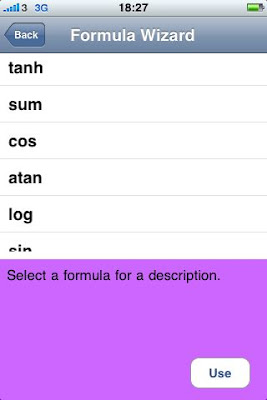
★ Offline formula wizard
★ Works with both Wireless & 3G and GPRS networks.
★ Context Aware Toolbar
★ Free Updates


3分鐘不用,就能簡單在
iphone上創建一個新EXCEL檔案,如圖顏色設定,字型設定,公式設定。。等全與EXCEL一樣。(比iphone更利害,他有COPY & Paste 功能)


亦支援非常多之公式 (相個常用之公式都支援)


迷之聲:係
iphone打咁多字都死啦。。。。


無錯,因此iSpreadsheet我覺最大好處就是支援Google Documents,可修改/創建EXCEL檔案,即可以係電腦先輸入左好多字元/數據,再係
iphone因需要而修改。
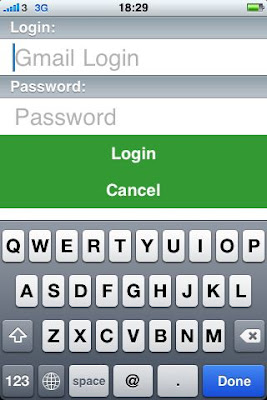
可在右上角接“G”進入Google ACC設定。


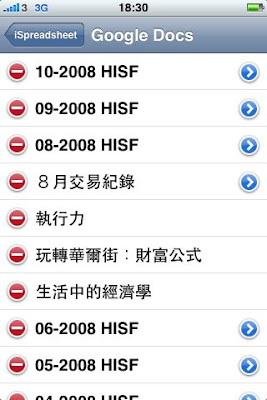
連上Google Documents後所有你之前在Google Documents的EXCEL檔案及WOEDS檔案都會出現,但你只可選取EXCEL檔案下載至
iphone作更改。(當然,WOEDS改到就唔係iSpreadsheet啦)


最後當在IPHONE修改好之檔案或新做之檔案,最方便更係要與Google Documents作同步啦。
按需要上載或同步至Google Documents檔案的右面箭咀。


有了,可以選儲存至Google Documents或與Google Documents同步了。

此軟件非常方便易用,特發在會場有小小野要改亦非常容易,什至乎不而要在手機上有檔案,
唯一要挑剔的是,既然EXCEL都能修改了,為什麼不加入埋WORDS功能???

免費期有限,又係個句啦,咪執輸~~冗